Showing posts with label Videogames. Show all posts
Showing posts with label Videogames. Show all posts
Monday, March 11, 2013
Minecraft PC Mods: Any Suggestions?
If you saw my earlier posts, you would know I have YouTube channel called "iAmNinjoe". Please give me Minecraft mods so I can showcase them on my channel. I will showcase the mods picked on my channel.

Minecraft PC Maps: Any Suggestions?
As you all know, I have a new YouTube channel called "iAmNinjoe". In this channel, I do these videogame LP's (Let's Play), skits, and other stuff. I've been thinking and...well...I want your ideas about what Minecraft PC custom maps I should do. Mini-game maps count as custom maps (in my eyes). The only maps that are not acceptable are maps that have content that is inappropriate or content that has profanity. Sooo...please give me ideas.
Minecraft PC Texture Packs: Any Suggestions?
You might as well know that Minecraft has a kind of unique "look" for itself. But, did you know that people make different "looks" for Minecraft called "texture packs". Here's what I want you to do, readers and YouTube video watchers:
1. Look for these texture packs for me to review in my YouTube channel, "iAmNinjoe".
2. Name them or link them to me in the comments of this post or my Minecraft videos.
That is it. It's easy! Please do these things for me, so that I can give you awesome reviews and playthroughs of different games.
1. Look for these texture packs for me to review in my YouTube channel, "iAmNinjoe".
2. Name them or link them to me in the comments of this post or my Minecraft videos.
That is it. It's easy! Please do these things for me, so that I can give you awesome reviews and playthroughs of different games.
Thursday, March 7, 2013
Minecraft PC Beta 1.4.7: How To Get Saddles
The only ways to find saddles are to trade with NPC villagers or look through chests in dungeons. I really wish that we can be able to craft saddles without having to search all those dungeons or trading extremely rare emeralds for 1 saddle. Tell me what you think about Minecraft saddles in the comments.
Minecraft PC Beta 1.4.7: What is the HUD?
What is the HUD? (of Minecraft PC Beta 1.4.7)
There are 4 things that make up the HUD in Minecraft PC (Beta).
This post will show you what the different parts are for and what you should do about them.
The Health Bar

The health bar tells you if you are dying, injured, or in tip-top shape! Your health bar falls when a player or mob hits you, touch lava, drown, suffocate, or fall off a high height. Certain effects from potions or mobs can change your health bar in a good or bad way. It is important to keep your hunger bar up to let your health bar heal over time if you got hurt.
The Hunger Bar

The hunger bar tells you if you are full, dying of hunger, or in between. Your hunger bar will go down faster if you sprint a lot. If your hunger bar is empty, you will start to die. You can refill your hunger bar by eating food. The last sentence of the paragraph, "The Health Bar", is true.
The Experience Bar

The experience bar tells you how much experience (XP) you have earned mining ores, killing mobs, and other stuff. If you passed an experience level, a number will show up on top of the experience bar. If you have enough experience levels you give awesome enchantments to your tools using an Enchantment Table. You can lose your experience when you die.
The Item Hotbar

The item hotbar contains all the items you want to have on-the-go, instead of having it in your inventory. Pressing different number buttons (1, 2, 3, 4, 5...) lets you scroll left to right across items. You can drop the items from your item hotbar, if you want.
The "Bubbles" Bar
The "bubbles" bar shows you how much time you have to breathe underwater. When the bar is empty, you will start losing health. The bar only shows up when you are underwater.
The Armor Bar

The armor bar shows how much protection and armor you have on you. You can obtain armor by crafting it and then putting it on you.
There are 4 things that make up the HUD in Minecraft PC (Beta).
This post will show you what the different parts are for and what you should do about them.
The Health Bar
The health bar tells you if you are dying, injured, or in tip-top shape! Your health bar falls when a player or mob hits you, touch lava, drown, suffocate, or fall off a high height. Certain effects from potions or mobs can change your health bar in a good or bad way. It is important to keep your hunger bar up to let your health bar heal over time if you got hurt.
The Hunger Bar
The hunger bar tells you if you are full, dying of hunger, or in between. Your hunger bar will go down faster if you sprint a lot. If your hunger bar is empty, you will start to die. You can refill your hunger bar by eating food. The last sentence of the paragraph, "The Health Bar", is true.
The Experience Bar

The experience bar tells you how much experience (XP) you have earned mining ores, killing mobs, and other stuff. If you passed an experience level, a number will show up on top of the experience bar. If you have enough experience levels you give awesome enchantments to your tools using an Enchantment Table. You can lose your experience when you die.
The Item Hotbar

The item hotbar contains all the items you want to have on-the-go, instead of having it in your inventory. Pressing different number buttons (1, 2, 3, 4, 5...) lets you scroll left to right across items. You can drop the items from your item hotbar, if you want.
The "Bubbles" Bar
The "bubbles" bar shows you how much time you have to breathe underwater. When the bar is empty, you will start losing health. The bar only shows up when you are underwater.
The Armor Bar
The armor bar shows how much protection and armor you have on you. You can obtain armor by crafting it and then putting it on you.
Thursday, January 24, 2013
I Got Minecraft PC Version!
I got Minecraft PC Version! That means I will post more posts about Minecraft PC!


Monday, January 21, 2013
Minecraft PC VS. Minecraft Pocket Edition
Here are some similarities and differences between Minecraft PC and Minecraft PE:
Differences:
The Wither
Enderman
The Enderdragon
Cave Spider
Spider Jockey
Blaze
Ghast
Magma Cube
Silverfish
Slime
Witch
Wither Skeleton
Zombie Villager
Bat
Mooshroom ( Cross between Red Mushroom and Cow )
Ocelot
Villager
Squid
Wolf
Snow Golem
Iron Golem
Minecraft PC has all of these.
Similarities:
Differences:
- Minecraft PE doesn't have fire because it caused a huge bug.
- The so-called "rose" in Minecraft PE can't be crafted into a dye. The rose in Minecraft PC can.
- Also, the so-called "rose" in Minecraft PE is cyan ( Light-Blue ) instead of red.
- In Minecraft PC, you can mine Redstone Ore and get something out of it. You can't get anything out of Redstone Ore in Minecraft PE.
The Wither
Enderman
The Enderdragon
Cave Spider
Spider Jockey
Blaze
Ghast
Magma Cube
Silverfish
Slime
Witch
Wither Skeleton
Zombie Villager
Bat
Mooshroom ( Cross between Red Mushroom and Cow )
Ocelot
Villager
Squid
Wolf
Snow Golem
Iron Golem
Minecraft PC has all of these.
- Minecraft PE doesn't have boats or minecarts. Minecraft PC does.
Similarities:
- Both games have zombies, zombie pigmen, skeletons, creepers, and spiders.
- Both games have pigs, sheep, cows, and chickens.
- Both games have the same playable character, Steve ( Stevie ).
Sunday, January 20, 2013
Google Easter Egg : Starfox 64 Reference
Starfox 64 comes to Google as an easter egg! Here's how to find it:
1. Go to Google.
2. Type in the Google Search Bar "do a barrel roll" or "z or r twice".
3. You made the screen do a barrel roll. Classic.
 Image From pokecommunity.com.
1. Go to Google.
2. Type in the Google Search Bar "do a barrel roll" or "z or r twice".
3. You made the screen do a barrel roll. Classic.

Saturday, January 19, 2013
Minecraft Pocket Edition : Bonus Fun Facts!

Redstone Ore is the only ore in Minecraft that does not exist in real life.
Also, did you ever notice that Lapis-Lazuli looks different than the other ores. ( Besides color )
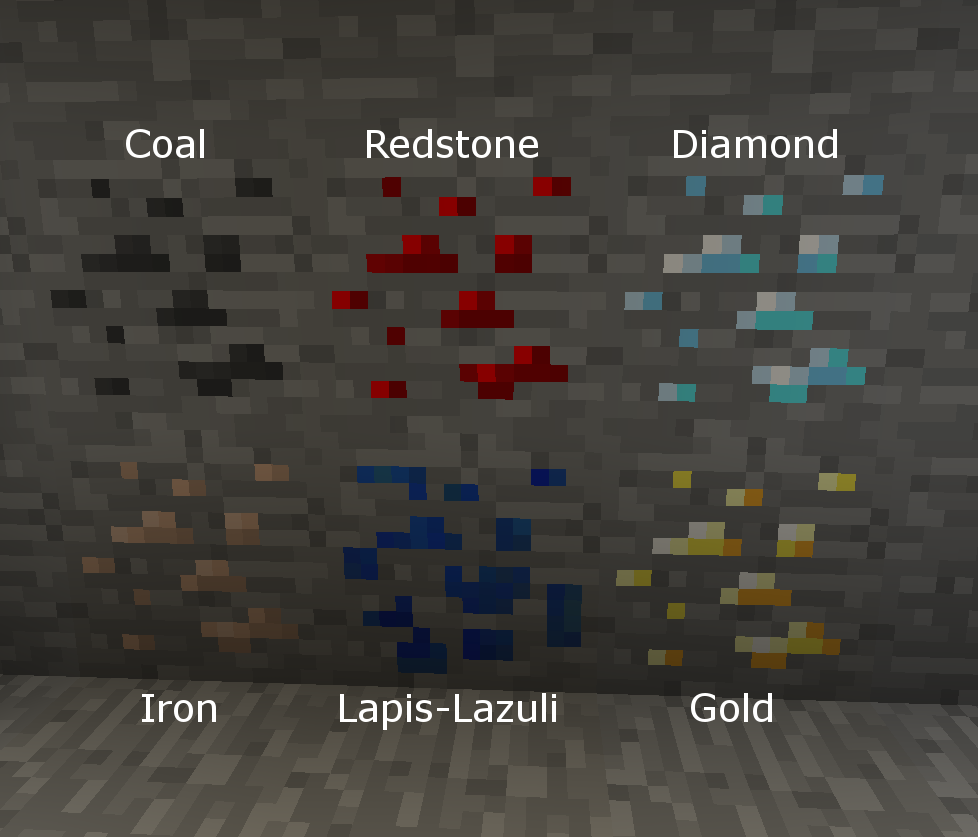 Image From technicpack.wikia.com.
Minecraft Pocket Edition : Useless Redstone Ore
Image From minecraftwiki.net.
We all know, especially me, that whenever you mine Redstone Ore, you get NOTHING. ( In Minecraft Pocket Edition ) You obtain NO Redstone Dust. I can't wait for the new update. So in conclusion, Redstone Ore can only be used as decoration at the moment. That means no levers, no complicated machines, or anything like that. If the update has already happened when you read this, then disregard this whole post unless you want to teach the history of Minecraft to whoever you want to teach it to.
.png)
Friday, January 18, 2013
Minecraft Pocket Edition : How To Get Red Dye
 Here's how to get Red Dye in Minecraft Pocket Edition:
1. Build a furnace.
2. Gather red mushrooms.
3. Smelt the red mushrooms in the furnace.
Now, you can turn ordinary wool into RED WOOL!!! Yay!
Sunday, January 13, 2013
Minecraft Pocket Edition : Seed With A Lot Of Gravel
Minecraft Seed : flowerpig
Here's how you can find lots of blocks of gravel:
1. Make a new game.
2. Set mode to Survival.
3. For the seed, put in "flowerpig". Remember, all lowercase.
4. You can find a LOT of blocks of gravel next to an ocean. It looks like a beach, only with gravel.
 Image Screen-captured From squidoo.com
Here's how you can find lots of blocks of gravel:
1. Make a new game.
2. Set mode to Survival.
3. For the seed, put in "flowerpig". Remember, all lowercase.
4. You can find a LOT of blocks of gravel next to an ocean. It looks like a beach, only with gravel.
Saturday, January 12, 2013
Wii Sports Resort : NES Mario Music Easter Egg
Logo Image Screen-captured From Google Images. Image From gamerlimit.com.
 Gameplay Image Screen-captured From Google Images. Image From YouTube
video "Wii Sports Resort easter egg: Super Mario Bros sounds".
Gameplay Image Screen-captured From Google Images. Image From YouTube
video "Wii Sports Resort easter egg: Super Mario Bros sounds".

Here is how to find a cool easter egg in Wii Sports Resort:
1. Select the activity "Air Sports".
2. Select the sub-activity "Island Flyover".
3. When you are flying the plane, find the i point "Hillside Cabins".
4. When you fly over it, you will hear the music from the famous NES videogame "Super Mario Bros.".
 Image Screen-captured From Google Images. Image From consoleclassix.com.


1. Select the activity "Air Sports".
2. Select the sub-activity "Island Flyover".
3. When you are flying the plane, find the i point "Hillside Cabins".
4. When you fly over it, you will hear the music from the famous NES videogame "Super Mario Bros.".
Minecraft Pocket Edition : Getting Flint
Image Screen-captured from Google Images. Image From minecraftwiki.net.

 Flint is obtained by mining gravel, but only 10% of the time you can get it. You can change the odds my using this simple trick.
1. Mine a block of gravel.
1a. If you didn't obtain flint the first time, pick up the block of gravel you just mined, and place the block on the ground.
2. Repeat Step 1 and Step 1a until you get flint out of the block of gravel.
1. Mine a block of gravel.
1a. If you didn't obtain flint the first time, pick up the block of gravel you just mined, and place the block on the ground.
2. Repeat Step 1 and Step 1a until you get flint out of the block of gravel.
Wednesday, January 9, 2013
Minecraft Pocket Edition : Seed To Get Diamonds Fast
Minecraft Seed : jpgaming
Here's how you get diamonds fast with this seed:
1. Make a new game.
2. Set mode to Survival.
3. For the seed, put in "jpgaming". Remember, all lowercase.
4. Right where you spawn, if you dig down deep enough, you'll find diamond ore.
5. Enjoy!
Image Screen-captured From Google Images. Image From minecraftopia.com.

Here's how you get diamonds fast with this seed:
1. Make a new game.
2. Set mode to Survival.
3. For the seed, put in "jpgaming". Remember, all lowercase.
4. Right where you spawn, if you dig down deep enough, you'll find diamond ore.
5. Enjoy!
Image Screen-captured From Google Images. Image From minecraftopia.com.
Friday, January 4, 2013
Tetris, Tetris, Tetris
The game Tetris was first invented by a Russian scientist named Alexey Pajitnov. Alexey developed the game on an Electronica 60.
Over the years, Tetris showed up in a lot of gaming consoles, such as the PC, NES, Gameboy, iPod, Blue Lava Wireless, Nintendo DS, Wii, iPad, mobile phones, and in the Playstation Network. It even showed up as an in-flight game in over 50 airlines worldwide.
Did you know that Tetris can be healthy to you? Scientific research has shown that players of Tetris developed a thicker cortex and better brain efficiency. Also, a study by Emily Holmes, P.H.D, of Oxford suggested that Tetris may help victims of Post Traumatic Stress Disorder.
Link to a site with different Tetris games - freetetris.org
Try to find these online games and play them:
- Tetris Sprint ( Try to make as many lines as you can to get the most points. )
- Monotris ( Instead of matching rows of blocks, you have to make basic Tetris shapes.
- Tetris Labs ( You are a scientist and you need to use Tetris blocks to make your way up to the flower. )
- Mario Tetris 3 ( Mario/Tetris Mashup )
- Tetris'D : The Game ( You are a stickman and Tetris blocks are falling on you. Try to survive. )
- RetroMash ( Space Invaders/Tetris Mashup )
- DropSum ( Sudoku/Tetris Mashup )
Roger Dean designed this logo for Tetris in 1997.
 Image Screen-captured From tetris.com.
Today, Tetris is one of the greatest retro games in world history.
Over the years, Tetris showed up in a lot of gaming consoles, such as the PC, NES, Gameboy, iPod, Blue Lava Wireless, Nintendo DS, Wii, iPad, mobile phones, and in the Playstation Network. It even showed up as an in-flight game in over 50 airlines worldwide.
Did you know that Tetris can be healthy to you? Scientific research has shown that players of Tetris developed a thicker cortex and better brain efficiency. Also, a study by Emily Holmes, P.H.D, of Oxford suggested that Tetris may help victims of Post Traumatic Stress Disorder.
Link to a site with different Tetris games - freetetris.org
Try to find these online games and play them:
- Tetris Sprint ( Try to make as many lines as you can to get the most points. )
- Monotris ( Instead of matching rows of blocks, you have to make basic Tetris shapes.
- Tetris Labs ( You are a scientist and you need to use Tetris blocks to make your way up to the flower. )
- Mario Tetris 3 ( Mario/Tetris Mashup )
- Tetris'D : The Game ( You are a stickman and Tetris blocks are falling on you. Try to survive. )
- RetroMash ( Space Invaders/Tetris Mashup )
- DropSum ( Sudoku/Tetris Mashup )
Roger Dean designed this logo for Tetris in 1997.
Today, Tetris is one of the greatest retro games in world history.
Sunday, December 23, 2012
Minecraft Pocket Edition: How To Make It Rain Cactus
Image Screen-captured From Google Images. This image is from the site, minecraftaddicts.com.
 Cactus blocks are found on sand in Minecraft Pocket Edition. There is a way to make it rain cactus blocks without any cheat codes or mods.
1. Find a beach.
2. Build a huge tower with cactus blocks on the sand. Make sure you build it as high as the game can let you.
3. Dig out all the sand blocks around it.
4. Remove the sand block under the big cactus tower.
5. Look up and see cactus rain.
Easiest Way: Creative Mode.

1. Find a beach.
2. Build a huge tower with cactus blocks on the sand. Make sure you build it as high as the game can let you.
3. Dig out all the sand blocks around it.
4. Remove the sand block under the big cactus tower.
5. Look up and see cactus rain.
Easiest Way: Creative Mode.
Subscribe to:
Posts (Atom)